CartoonDream-Aging Face Filter
FutureDream Entertainment LimitedArt & Design
4.4857.00 Reviews
- Version
- 1.3.9
- Installs
- 500.00K
- Age Rating
- Everyone
Screenshots
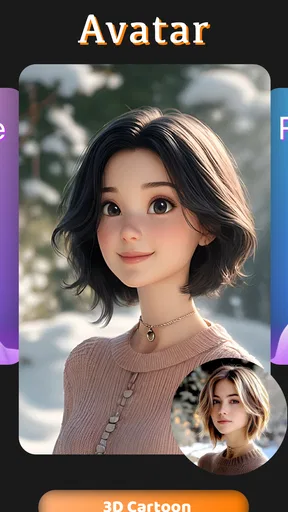
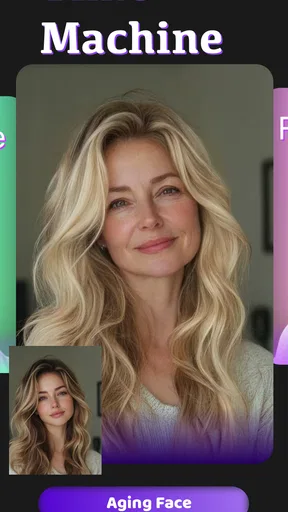
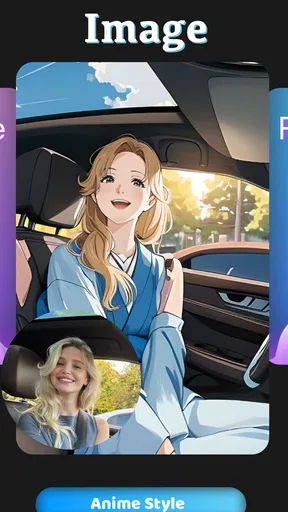
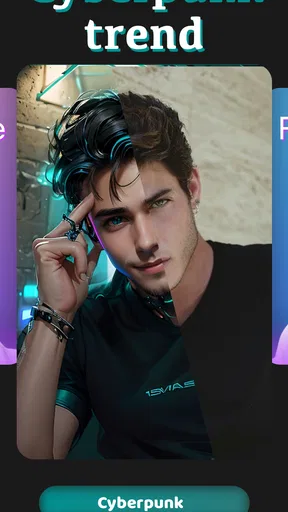
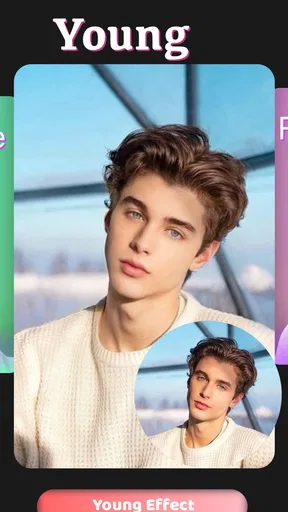
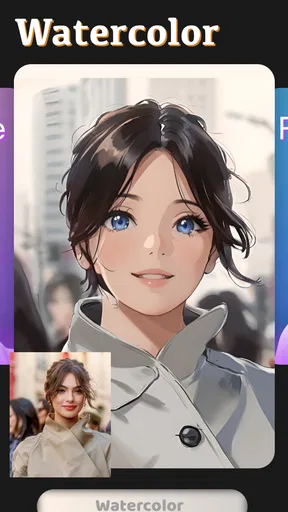
Our Review of CartoonDream-Aging Face Filter
 Analysis by Appyee
I treat face-editing apps as playful tools rather than reliable ways to predict appearance. That distinction matters with CartoonDream-Aging Face Filter: its appeal is the chance to make a photo feel surprising or artistic, not to get a trustworthy forecast of how anyone will look years from now. When I use an aging effect, I enjoy the visual experiment while keeping its result firmly in the realm of entertainment.
What I would check before sharing a face photo
Face images can feel more personal than an ordinary snapshot, so I think it is worth pausing before choosing one. I look at the photo itself, whether it includes other people, and where I plan to send the finished image. A close-up portrait of just me is a different choice from a family photo or a picture that also shows a child. If the goal is simply to amuse a friend, a casual image without identifying details may be the more comfortable starting point.
I don’t assume that a creative effect tells me what happens behind the scenes with an image. Instead, I make a practical decision based on what I can see and control in the moment: which photo I select, whether I save the result, and whether I share it. If you want to keep a face image out of a third-party editing workflow altogether, the sensible alternative is to use a tool whose image handling you already understand, or to avoid uploading that particular photo.
Keep the experiment low-stakes
The aging filter is best approached as a visual joke, a conversation starter, or a way to test a creative idea. I would not use its output to make decisions about skincare, health, or what I will actually look like later in life. Lighting, expression, camera angle, and the source picture can all affect how a filter reads, so even a convincing result is still an edited interpretation rather than evidence.
That also changes how I would share it. I’d introduce the image as a filter result instead of presenting it as a genuine prediction, especially if it is going into a group chat or a public post where someone might see it without context. That small bit of framing keeps the joke fun and avoids giving the effect more authority than it deserves.
Who gets the most from a quick makeover
I can see this app suiting someone who enjoys low-effort photo play: making a cartoon portrait for a profile, creating a silly before-and-after for friends, or trying an artistic look when a regular selfie feels too plain. It is also a handy kind of activity for a quiet break. You can start with one picture, compare a couple of visual directions, and decide whether any result is worth keeping.
I’d be more cautious about recommending it to someone who needs precise retouching, consistent illustrations, or a polished image for professional use. A filter-led app is not a substitute for a drawing program where you can shape every detail, nor is an age transformation a dependable portrait brief. If exact control over linework, color, facial proportions, or export workflow matters, a dedicated image editor is likely to be a better fit.
CartoonDream-Aging Face Filter is a free art-and-design app from FutureDream Lab, with a 4.4 average from around 3,400 ratings and over 500,000 installs. It is rated for Everyone, and its current version is 1.3.9. Those figures suggest that it has found an audience, but they don’t tell me whether a particular filter will suit your taste; the useful question is whether its playful, quick-edit approach matches what you want to do with your own photos.
A practical way to try it
For a first session, I’d use a well-lit portrait with the face clearly visible and no important details near the edges. I’d keep a copy of the original photo, then compare the edited result with it before deciding to save or share anything. This gives you a simple way to judge whether the effect is enjoyable without letting a dramatic filter become the only version of the image you have.
For a group chat, I might make a cartoon portrait of myself first and send it as a lighthearted reaction. For a family gathering, I’d ask before editing or sharing someone else’s face, even when the intention is just a joke. And if an effect makes someone uncomfortable, I’d drop that version rather than treating the discomfort as part of the fun. These small choices matter more than finding the most dramatic filter.
How it sits beside other creative tools
Compared with a general photo editor, a filter-focused app is appealing when I want to reach a finished look quickly rather than adjust every layer manually. Compared with a drawing app, it asks less of me creatively: I start with a photo and explore transformations instead of building an image from a blank canvas. That convenience is the trade-off. The more a result depends on a preset, the less control I have over precisely how it treats a particular face or photo.
If I were preparing a consistent set of portraits, making careful corrections, or creating artwork that needs to match a specific style, I’d choose a more controllable editor. If I only want a fast cartoon treatment or an amusing aging effect, a lightweight filter experience makes more sense. The best choice depends on whether speed and surprise matter more than fine adjustment.
Cost, expectations, and everyday limits
The app is free to install, while in-app purchases range from about $25 to $160 per item. I’d explore the free experience before spending anything and think about how often I would genuinely use paid options. A one-off laugh from a filter is a different value proposition from a tool that becomes part of a regular creative routine. I would check the purchase screen carefully and avoid treating a paid option as necessary until I know what it adds for my own use.
CartoonDream is aimed at casual experimentation, so it may not satisfy someone who expects every transformation to look natural or every result to be equally flattering. The aging effect can feel stronger than intended, and that is a reason to treat it as stylization, not a subtle portrait correction. Similarly, a striking cartoon result may work well as a playful share but not as a realistic likeness. Picking a source photo with a clear face helps make the experiment easier to judge, but it cannot guarantee a particular outcome.
Choosing photos with intention
One useful habit is to decide what the finished image is for before choosing a filter. A private joke can tolerate a dramatic, exaggerated result; a profile picture usually benefits from a look you will still feel comfortable using later. I would also avoid editing a photo that someone else has shared with me unless I have permission, and I’d think twice before posting a transformation that could embarrass the person in it.
If the result is meant for a social post, I’d review the image at full size before sharing, rather than relying only on a small preview. A face effect can look amusing in a thumbnail and unexpectedly intense when enlarged. I’d also keep the original if I might want to revisit the picture without the effect. That simple workflow preserves choice without requiring a complicated editing process.
What the app is—and is not—for
CartoonDream is most appealing when the goal is a quick creative detour: a cartoon version of a selfie, a playful aging comparison, or an image to spark conversation. It is less suitable when the photo is sensitive, when you need precise control, or when the image has to meet a formal standard. I would also skip the aging effect if I knew I was likely to take its result personally; a deliberately stylized filter can make ordinary features look harsher than they are.
For younger users, the Everyone content rating makes the app broadly suitable in store terms, but I’d still encourage a conversation about asking before sharing someone’s face and thinking carefully about where edited pictures go. A creative tool can be lighthearted while the images remain personal. That is a sensible boundary whether the photo belongs to an adult or a child.
My cautious recommendation
My overall view is that this is a straightforward option for people who want fast, playful photo transformations and are comfortable making their own choices about the images they use. It is not a tool I’d rely on for realistic aging predictions, detailed retouching, or work that needs a carefully controlled visual style. The free starting point makes it easy to see whether the creative approach suits you, while the in-app purchase range is a reason to be deliberate before buying.
If I were recommending it to a friend, I’d say: try it with a photo you are comfortable editing, keep the original, and treat the results as entertainment. If you want a quick cartoon or an amusing glimpse of an imagined older version of yourself, it can be enjoyable. If privacy certainty, exact artistic control, or a highly natural result is your priority, choose a tool that better fits that need.
First Impressions
So, right off the bat, CartoonDream-Aging Face Filter is all about creativity and fun. You launch the app, and it’s like stepping into a digital playground. The interface is super user-friendly. I mean, I'm not tech-savvy by any stretch, but navigating through the options felt like a breeze. Everything is laid out clearly, and it doesn’t take long to figure out where all the magic happens.
Features Galore
One of the standout features is definitely the aging filter. I’m telling you, it’s eerily accurate. You upload a photo, and within seconds, you get a glimpse of future you. It’s both fascinating and a little scary, but in a good way. The detail is impressive, capturing not just wrinkles but also subtle changes in your facial structure.
Beyond aging, the cartoon filter is where the app really shines. Ever wondered what you’d look like as a character in an animated film? This feature turns your photo into a cartoon version of yourself. The colors are vibrant, and the style is versatile enough to suit different tastes.
Playing Around with Filters
Let’s talk about the other filters because this app has them in spades. From turning your photo into a renaissance painting to giving you a futuristic cyberpunk look, there’s a lot to explore. It’s like having a mini art studio in your pocket. The app also lets you adjust the intensity of each filter, so if you want to keep things subtle, you can totally do that.
And, oh, the sharing options! You can easily post your creations on social media directly from the app. It’s perfect for those Instagram stories or a quick Facebook update to surprise your friends.
Performance and Usability
Now, onto performance. The app runs smoothly on both Android and iOS. I didn’t experience any annoying lags or crashes, which is always a plus. The loading times for the filters are pretty quick too, so you’re not left twiddling your thumbs waiting for the magic to happen.
Usability-wise, it’s very intuitive. The icons are clear, and there are little tips that pop up to guide you if you’re stuck. Even if you’re new to these kinds of apps, you’ll find yourself getting the hang of it in no time.
A Few Quirks
Of course, no app is perfect. Sometimes the aging filter can be a bit too harsh, adding more years than you’d expect. But hey, it’s all in good fun, right? Also, while most features are free, there are a few premium options. If you’re really into the app, it might be worth considering the upgrade.
There are also occasional ads, but they’re not too intrusive. They pop up mainly when you're saving or sharing your images, so it’s not a dealbreaker.
Final Thoughts
All in all, this is a delightful app for anyone looking to have a bit of fun with their photos. It’s easy to use, packed with features, and offers a creative outlet for those looking to experiment with their digital self. If you’re curious about what the future holds or just want to see yourself as a cartoon character, this app is worth checking out.
So, what are you waiting for? Give it a try and let your imagination run wild!
Verdict
Strengths of CartoonDream-Aging Face Filter
- Easy-to-use interface for quick edits.
- Variety of filters for different effects.
- Real-time preview before applying changes.
- Lightweight app with minimal storage use.
- Regular updates with new features.
Limitations of CartoonDream-Aging Face Filter
- Limited free features; many are paid.
- Occasional glitches with older devices.
- Requires internet for full functionality.
- Ads can be intrusive during usage.
- Lacks advanced editing tools.
Other Releases by FutureDream Entertainment Limited
View All
Future Face - See Your Future
Photography4.4
Similar Picks in This Category
View All
Canva: AI Photo & Video Editor
Canva4.8

PENUP – Drawing-sharing SNS
Samsung Electronics Co., Ltd.4.5

Crafto
Kutumb App4.6

Sketchbook
Sketchbook4.1

ibis Paint X
ibis inc.4.5

Adobe Express: AI Photo, Video
Adobe4.6
Frequently Asked Questions
What is CartoonDream-Aging Face Filter used for?
CartoonDream-Aging Face Filter is an app designed to transform your photos with fun and creative effects. It allows users to apply cartoon and aging filters to their images, giving them a unique artistic touch. Whether you want to see yourself as a cartoon character or explore how you might look in the future, this app provides a playful experience.
Is CartoonDream-Aging Face Filter safe to use?
Yes, CartoonDream-Aging Face Filter is generally safe to use. It requires access to your device’s camera and photo gallery to function correctly. However, it's important to download the app from reputable sources, like the Google Play Store or Apple App Store, to ensure you're getting a legitimate version without any malware.
Does CartoonDream-Aging Face Filter work offline?
CartoonDream-Aging Face Filter primarily functions online as it often utilizes cloud-based processing to apply complex filters. While basic features might be available offline, an internet connection ensures access to the full range of effects and updates. It's best used when connected to Wi-Fi or mobile data.
Can I share my creations from CartoonDream-Aging Face Filter directly to social media?
Yes, CartoonDream-Aging Face Filter supports easy sharing options. After editing your photo, the app allows you to share your creations directly to popular social media platforms like Instagram, Facebook, and Twitter. This feature makes it convenient to showcase your artistic transformations with friends and followers.
Are there any in-app purchases or subscriptions in CartoonDream-Aging Face Filter?
CartoonDream-Aging Face Filter is free to download, but it offers in-app purchases and subscription options. These might include access to premium filters, ad removal, or additional editing tools. Users can choose to enhance their experience by purchasing these features, but the app provides basic functionality at no cost.
